Quick Guide to Sound Sensor

Welcome to my world of Internet of Things and Cloud Computing. I received my bachelor's degree in the discipline of Internet of Things. I also write technical articles. I am now pursuing a Masters degree in Cloud Computing. I am an Amazon Web Services Certified Cloud Practitioner.
Welcome to this interesting series of sensors. Today, I will explain Sound Sensor.
🍁What is Sound Sensor?
A Sound sensor is used to notice the sound. Generally, this module is used to detect the intensity of sound.
🍁What's the working funda of Sound Sensor?
The fundamental function of a sound sensor, which uses a microphone, is to translate vibrations into current or voltage. It comprises of a diaphragm composed of magnets coiled with metal wire in general. Magnets within the sensor shake as sound waves contact the diaphragm, and current can be stimulated from the coils at the same time.
🍁How Sound Sensor looks like?
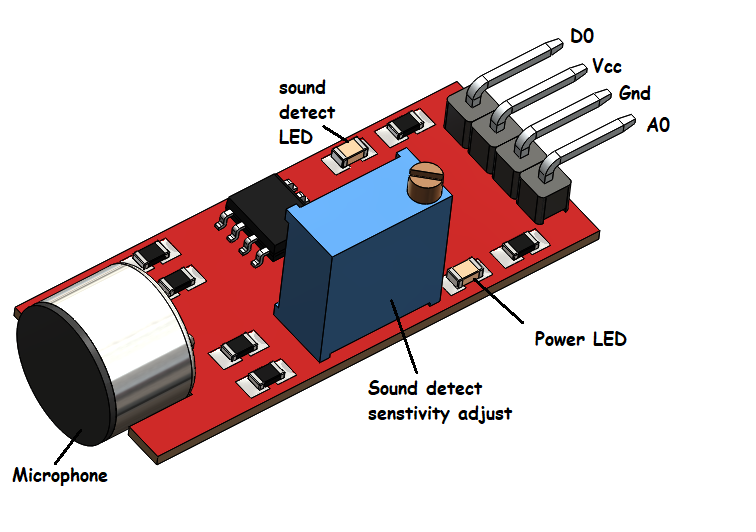
🍁Pin description of Sound Sensor
- D0 -> The digital output. Works like a switch and can be adjusted using a variable resistor on the output board.
- Vcc -> Connects to
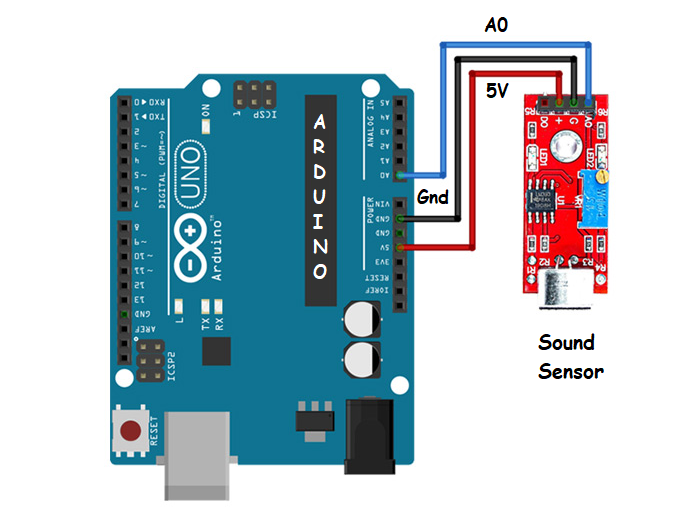
5vpin of Arduino - Gnd -> Connects to
Gndpin of Arduino - A0 -> The analog output. It’s value changes according to the intensity of the received sound. It can be connected to the Arduino analog pins.
🍁Interfacing of Sound Sensor with Arduino
🍁Source Code
For Analog Output
void setup() {
  // initialize serial communication at 9600 bits per second:
  Serial.begin(9600);
}

// the loop routine runs over and over again forever:
void loop() {
  // read the input on analog pin 0:
  int sensorValue = analogRead(A0);
  // print out the value you read:
  Serial.println(sensorValue);
}
For Digital Output
Connect D0 pin of sensor to any of the digital pin of Arduino
const int mic =  8;
void setup() {
  // initialize serial communication at 9600 bits per second:
  Serial.begin(9600);
  // initialize the digital pin as an input:
  pinMode(mic, INPUT);
}

void loop() {
  // check if the mic digitalout is high.
  if (digitalRead(mic) == HIGH) {
    Serial.println("hearing something");
  }
}
🍁Applications of Sound Sensor
- Used in Security system for Office or Home
- Used in Spy Circuit
- Used in Home Automation
- Used in Robotics
- Used in Smart Phones
- Used in Ambient sound recognition
- Used in Audio amplifier


