LabVIEW Programming Basics

Welcome to my world of Internet of Things and Cloud Computing. I received my bachelor's degree in the discipline of Internet of Things. I also write technical articles. I am now pursuing a Masters degree in Cloud Computing. I am an Amazon Web Services Certified Cloud Practitioner.
Hello Readers!!
In this post, we will look at a tool that can aid with both testing and data collection. LabVIEW is the name of the software.
Introduction to LabVIEW
- LabVIEW means Laboratory Virtual Instrument Engineering Workbench.
- LabVIEW is a programming language that is graphical in nature.
- Jeff Kodosky invented LabVIEW. He invented it at National Instruments.
- Scientists, engineers, and other domain specialists have traditionally utilized it to swiftly construct systems.
- LabVIEW applications are referred to as VIs. VI is an abbreviation for Virtual Instrument.

Benefits of LabVIEW
- Having a graphical interface makes programming in LabView simple.
- It is excellent for simulations.
- A user will be able to demonstrate how data flows within a virtual instrument.
- Convenient for generic programming
- The fundamentals of programming can be introduced.
- Completely adaptable in terms of constructing a virtual instrument based on your specifications.
- You may quickly adjust the virtual instruments whenever you need to.
LabVIEW Environment
LabVIEW is a visual programming application development environment. The LabVIEW environment is used to create, debug, and manage programs written in the graphical programming language 'G.'
Components of LabVIEW
- Front Panel: It is application's user interface. User interface elements called Controls and Indicators are available on the Controls Palette.
- Block Diagram: It is application's code. Code elements including Primitives, VIs, and Express VIs are available on the Functions Palette.
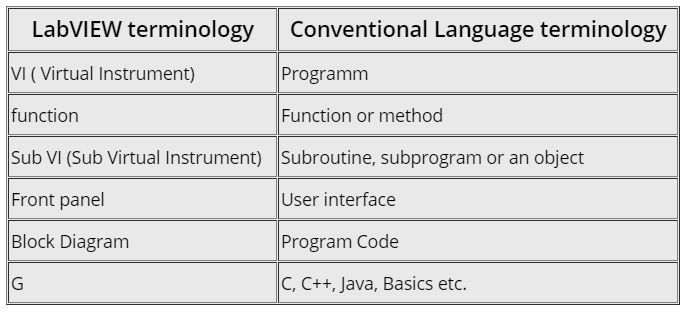
LabVIEW terminology vs Conventional Languages
In this portion of the article, we shall compare and contrast common vocabulary used in conventional languages with LabVIEW nomenclature.
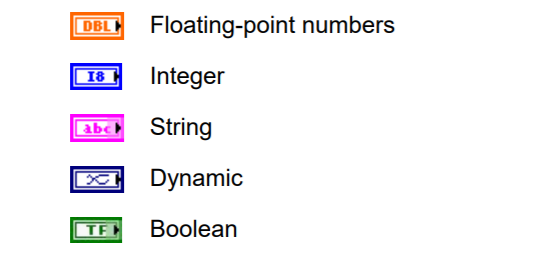
Data Types in LabVIEW
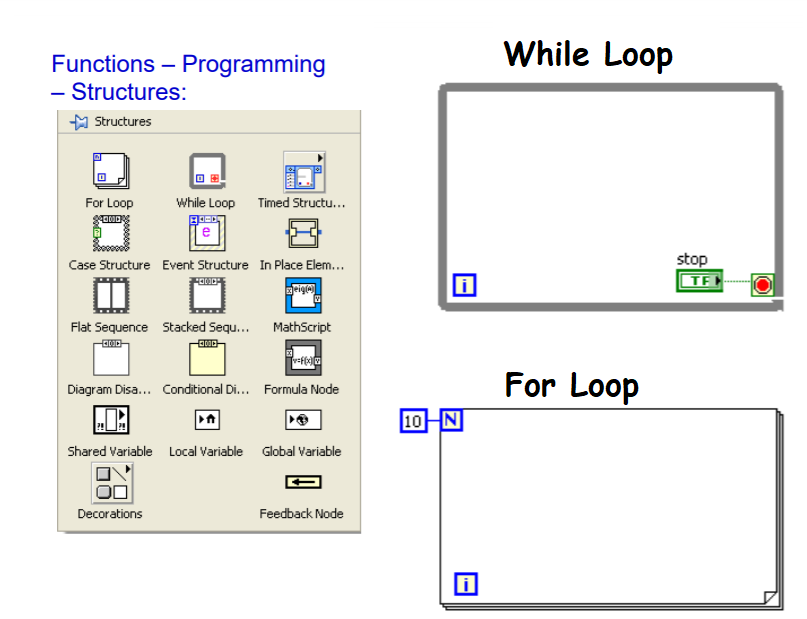
Loops in LabVIEW
How does LabVIEW interact with the real world?
There are 4 ways that software developed with LabVIEW interacts with the real world (all requiring hardware with an appropriate processor on board (either desktop PC-based or SoC (System-On-Chip) based):
- A GUI – either with a standard monitor or touch panel.
- Interfacing with lab equipment/instruments (e.g. through GPIB, Ethernet, USB, PCI, RS-422) – for example power supplies, power meters, multi-meters, spectrum analyzers, oscilloscopes, switch matrices, and signal generators.
- Measuring a signal with NI hardware (analog or digital) – for example temperature, pressure, vibration, current, load, voltage, flow, light, acoustics, force, location/orientation, vision, humidity/moisture, RF emissions, and magnetic field.
- Controlling a signal with NI hardware (analog or digital) – for example motor control, actuator control, or mass-flow controllers.
What hardware does LabVIEW run on?
LabVIEW can run on any of these platforms:
- A Windows-based PC
- A Windows-based PXI
- An NI CompactRIO
- An NI Single-Board RIO (including the NI SOM)
Common misunderstanding
The most widespread misconception about LabVIEW is that you can open it and start developing robust apps straight immediately. You can absolutely create something right immediately, but you wouldn't want to rely on it not having flaws, crashing, or being updated in the future. It is a complicated language, comparable to other text-based languages.
Wrapping Up
Users may still utilize traditional programming languages to automate testing and handle data collection, but the amount of work required to do so is much higher when compared to LabVIEW. Using its user interface and graphical programming language, execution may be completed in less time while maintaining quality and productivity. Using this sophisticated tool will undoubtedly assist users in handling their data processing and data display more wisely.


